
Skip to content
logo-dgreen
  • Tutorials
  • FAQs
  • Contact Us
  • Login
  • Portal
Menu
  • Tutorials
  • FAQs
  • Contact Us
  • Login
  • Portal

View Household Meetings

  • Household, Members, Reports
View Household Meetings encoded in the Members Portal
  1. Click the Area tab. The Area tab has your area name on it.
  2. At the lower right side of the page, you will find the Household Meetings label. Click on the load report.
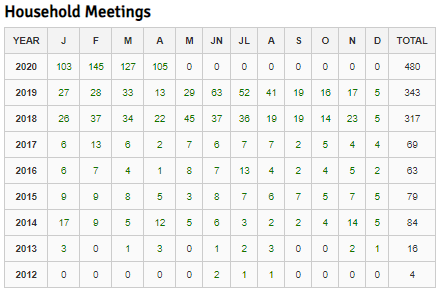
  1. The year, months and the number of household activities encoded through the Members Portal will be generated. The green numbers are links where you can view the attendance of each household conducted.
1
PrevUpdating of accurate Household structure
Create New Account in the CFC Members PortalNext
Other Tutorials

Create New Account in the CFC Members Portal

View Household Meetings

Retrieve Account Password

Add Household Attendance using the Members Portal

Add attendance to Activity

How to use ACS (Windows) to record attendance?

FAQs

Why is there no “Household” in the Activities Option?

How can we delete a member’s double account?

What to do if we forgot password?

Can multiple devices be used to get attendance in one activity?

Can “Guest” accounts be used to update member list in the ACS?

Can we delete an inactive member’s account?

Related Tutorials
  • Activities
  • Evangelization
  • FAQs
  • Household
  • Members
  • Reports
  • User Accounts
  • Tutorials
  • FAQs
  • Contact Us
  • Login
  • Portal
Menu
  • Tutorials
  • FAQs
  • Contact Us
  • Login
  • Portal
Help and Learn