Skip to content
logo-dgreen
  • Tutorials
  • FAQs
  • Contact Us
  • Login
  • Portal
Menu
  • Tutorials
  • FAQs
  • Contact Us
  • Login
  • Portal

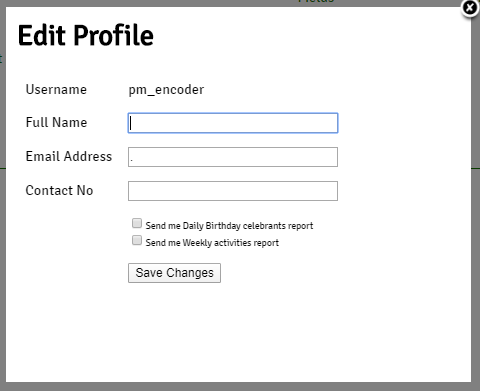
Update Account Details

  • User Accounts
  1. Click the account username at the upper right side of the screen.
  2. Input the complete details for the account. Make sure to fill up a valid email address. If ever you forget your password, this is where the password will be emailed.
  1. Click Save Changes once finished.
PrevGenerate Reports
Update account password in settingsNext
Other Tutorials

Log In to YFC Infosystem

Edit Member Service

Updating of Formation Track attendance

Generate Reports

Check attendance in all Formation Tracks conducted within area

Add Formation Track Activity

FAQs

What to do if we forgot password?

How can we delete a member’s double account?

Can we delete an inactive member’s account?

Can “Guest” accounts be used to update member list in the ACS?

Why is there no “Household” in the Activities Option?

Can multiple devices be used to get attendance in one activity?

Related Tutorials
  • Activities
  • Evangelization
  • FAQs
  • Household
  • Members
  • Reports
  • User Accounts
  • Tutorials
  • FAQs
  • Contact Us
  • Login
  • Portal
Menu
  • Tutorials
  • FAQs
  • Contact Us
  • Login
  • Portal
Help and Learn